From Photoshoot to Promptshoot: Replacing Studio Days With AI Model Pipelines
1/12/20265 min read
From Photoshoot to Promptshoot: Replacing Studio Days With AI Model Pipelines
Fashion imagery used to be a calendar problem: book the studio, lock talent, ship samples, coordinate HMU, pray the lighting looks like the last campaign, and hope you captured enough angles for product pages, ads, and social.
In 2026, the constraint isn’t “Can we create beautiful images?” It’s “Can we create enough beautiful, consistent images fast enough to keep up with drops, colorways, and performance marketing?”
That’s where the industry is moving from photoshoot to promptshoot: a production model where your “shoot” is a repeatable AI pipeline—built to generate premium, on-brand imagery at ecommerce scale. For a brand like Noir Starr Models, promptshooting isn’t about replacing artistry. It’s about operationalizing it: turning your aesthetic into a system that can produce thousands of images without losing the brand’s signature look.
This post breaks down what an AI model pipeline actually looks like, how to build it, and what to watch out for so your content converts without looking synthetic.
What “Promptshoot” Really Means (and What It Doesn’t)
A promptshoot is not “type a sentence, get a model.”
A promptshoot is a controlled production workflow that combines:
A locked model identity (so your model looks like the same person across outputs)
Repeatable lighting and pose direction (so your brand aesthetic stays consistent)
Product accuracy processes (so lingerie construction doesn’t warp or drift)
Quality assurance (so you never publish uncanny or policy-risky images)
Export rules (so assets are ready for PDPs, ads, and social without chaos)
Think of it like this:
A traditional photoshoot is a one-time event that produces assets.
A promptshoot pipeline is a manufacturing line for assets—creative, but structured.
The brands that win won’t be the ones that can generate “cool AI images.” They’ll be the ones that can generate repeatable, premium, conversion-safe catalogs on demand.
Why Lingerie Brands Feel the Pain First (and Benefit First)
Lingerie and glamour categories amplify every small production issue:
Skin texture needs to look real under dramatic lighting
Lace, mesh, and satin are difficult to render convincingly
Fit must look plausible (strap tension, seam placement, edge definition)
Platforms can be strict about “adult” signals in ads and thumbnails
At the same time, lingerie benefits the most from promptshooting because:
Drops and colorways multiply SKU image needs quickly
The difference between a “good” and “great” hero image is huge for conversion
Brands often want consistent model identity across campaigns (recognition sells)
Promptshooting is the logical answer to the modern ecommerce reality: more assets, faster cycles, tighter consistency.
The Promptshoot Pipeline (Noir Starr–Style)
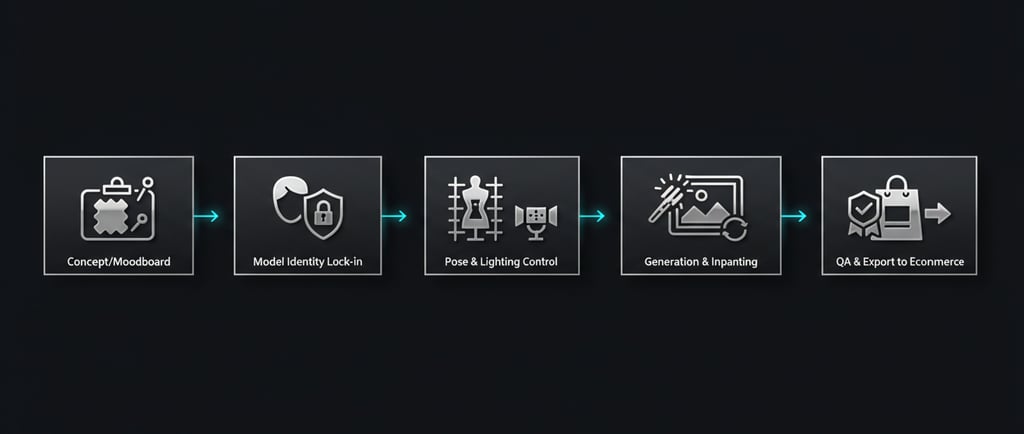
Below is a practical pipeline you can run weekly—whether you’re generating 30 hero images for a launch or 3,000 SKU variations for a catalog refresh.
1) Define a “House Look” (Your Creative Spec)
Before prompts, you need a spec—exactly like a shoot deck.
Build a one-page “house look” document that defines:
Lighting: noir high-contrast, rim light strength, shadow depth, color temperature
Camera language: focal length feel, crop rules (waist-up vs full body), DOF
Background: minimalist dark studio vs textured loft vs soft haze
Mood: confident, mysterious, premium (avoid cartoonish or overly glossy skin)
Styling constraints: jewelry minimalism, hair texture rules, makeup intensity
Brand-safe boundaries: what’s acceptable for PDP vs paid ads vs social
This becomes your “north star” for everything else. Without it, generation drift is guaranteed.
2) Lock the Model Identity (Consistency Is the Moat)
Your best-performing model identity should be stable across:
angles (front/side/three-quarter)
distances (tight crop to full body)
outfits (different sets, different fabrics)
lighting scenarios (studio noir, loft noir, etc.)
Common approaches to identity locking include:
Fine-tuning lightweight adapters (e.g., LoRA-style workflows)
Reference-image guided identity systems
Curated identity “anchors” (a small set of canonical images that define the model)
Your goal: when a customer sees five images on a product page, they never feel like the model changed.
Consistency drives:
trust
perceived brand professionalism
repeat customers (familiarity sells)
3) Control Pose and Camera Like a Real Shoot
The fastest way to “AI-fail” is to let the model freestyle poses.
Instead, treat poses like a library:
Pose packs for lingerie PDPs (front, three-quarter, side, back, detail)
Pose packs for ads (dynamic, stronger emotion, bolder angles)
Pose packs for editorial (leaning, seated, silhouette shots)
Add camera rules:
PDP: consistent cropping and distance across SKUs
Ads: bold composition, more negative space for product callouts (even if you don’t render text in-image)
This is where structured control methods (pose guidance, composition constraints) can massively reduce weird anatomy and inconsistent framing.
4) Light It Like Noir Starr (Stop Accepting Flat AI Lighting)
Lighting is the “signature.” If you lose lighting consistency, you lose brand feel.
For noir luxury glamour, your pipeline should reliably reproduce:
deep shadows without crushing detail
a clean rim highlight separating subject from background
controlled specular highlights on satin (not plastic glare)
a restrained palette (charcoal, black, subtle cool accents)
The difference between “AI image” and “editorial campaign” is often just lighting discipline.
5) Generation + Inpainting (Where You Fix What AI Gets Wrong)
High-end promptshooting assumes you will correct issues.
Common lingerie fixes:
Lace edges that melt into skin
Strap geometry and symmetry
Mesh/sheerness realism
Hands, fingers, jewelry tangles
Fabric seams drifting or duplicating
A typical flow:
Generate candidate images in batches (fast exploration)
Select winners by composition and expression
Inpaint problem areas (slow precision)
Upscale and refine skin texture (avoid waxy smoothing)
This is the AI equivalent of selecting selects + retouching.
6) QA: A Conversion-Safe Checklist (Non-Negotiable)
Before anything hits a PDP or ad account, run QA.
Anatomy & realism
hands, fingers, teeth, eyes: no uncanny artifacts
shoulders/hips/waist: plausible proportions
no duplicated limbs or warped joints
Garment accuracy
straps attach correctly
lace pattern doesn’t “swim” across frames
closures and seams are plausible
no texture smearing at edges
Brand consistency
lighting matches house look
background matches collection
model identity matches the campaign set
Platform safety
avoid thumbnails/crops that trigger moderation
keep posing tasteful and premium for broad distribution
QA is what protects your conversion rate and your brand reputation.
7) Export Like a Machine (Naming, Crops, and Channel Packs)
Promptshooting gets powerful when export is standardized.
Create channel packs:
PDP: 1:1 and 4:5 crops, neutral background variants
Ads: 4:5 and 9:16, extra negative space variants
Social: curated “editorial set” with consistent sequencing
Naming conventions matter more than people want to admit. If your team can’t find assets, your speed advantage disappears.
The New Team: Roles in a Promptshoot Operation
You don’t need a huge staff, but you do need clarity.
Typical roles:
Creative Director: owns house look, selects, final approval
AI Producer: runs batches, tracks prompts/settings, manages libraries
Retouch/QA Lead: inpainting, realism fixes, policy-safe review
Ecom Ops: exports, crops, filenames, uploads, variant mapping
In smaller teams, one person can cover multiple roles—but the responsibilities still exist.
Cost, Speed, and Scale: Why Pipelines Beat Studio Days
A studio day is expensive because it’s time-locked:
talent availability
physical logistics
sample readiness
post-production backlog
A promptshoot pipeline flips the model:
generate 50 candidates in an hour
pick 10 winners
retouch/inpaint the top 3
export to PDP and ads the same day
The real unlock is not “cheap images.”
It’s cycle time and volume without chaos.
The Biggest Mistake Brands Make (and How Noir Starr Can Avoid It)
The mistake: treating AI content like a slot machine.
If every output is a new model, new lighting, new background, new vibe, you don’t build a brand—you build noise.
Noir Starr’s advantage is doing the opposite:
consistent model identities
consistent noir luxury lighting
consistent editorial language
consistent product realism standards
That consistency is what makes AI feel premium instead of synthetic.
Final Take: Promptshooting Is a Production Mindset
Promptshooting isn’t “AI replacing photos.” It’s a new production discipline where your aesthetic becomes repeatable, measurable, and scalable.
If you build the pipeline correctly, you get:
faster launches
more creative testing
stronger catalog consistency
better conversion assets—without burning weeks on logistics
And in a market where attention is expensive, the brand that can ship premium visuals weekly wins.
Luxury
Elevate your brand with our exclusive AI models.
Contact us
Exclusivity
© 2026. All rights reserved.
(609) 901-8073